Memberbook integration using FTP PULL and PUSH.
Employee directory management with Active Directory
To get the most out of Veris features, you’ll need to populate the employee directory. Veris supports employee Provisioning from Active Directory. Using a simple script, you can Provision ten or ten thousand employees in moments. Setting up the Veris + Active Directory Provisioning means you can easily deploy Veris across your entire organization, no matter the number of employees or offices. And since all updates to your AD account are pushed to Veris, you’ll automatically onboard and offboard employees as your team grows and changes.
Benefits
- Provision employee details from Active Directory to Veris with a few lines of code
- Makes it quick and simple to roll out Veris at multiple offices
- Automatically update your Veris employee directory when you update Active Directory.
Veris’s team is here to help your IT team set up a script to automate your directory Provisioning (A CSV upload from your AD instance to be scheduled periodically). Requirements and configurations can be discussed mutually.
Alternate: Provision via Middleware using Secure Web Service
The Organization should create a secure authenticated Web Service in it’s DMZ environment that Veris can query for the latest list of employees. Organization should periodically send a CSV dump from your AD instance to DMZ. The employee detail should have the following data points:
- Name (First Name & Last Name)
- Designation or Department (Visible in VMS to differentiate Employees of same name)
- Email ID
- Phone Number (Optional)
- Active Status (whether the employee has left the organization)
- Group Name (This should ideally be based on the Office or Location name. Employees are organized into Groups and these Groups are assigned to VMS Venues for Access and Permission to Invite. For example: HQ, Mumbai Office or any other nomenclature that your company follows for office locations).
The accepted formats for the web service response are JSON, SOAP1.1 and SOAP1.2.
A sample JSON response looks like:
{
"employees": [{
"name": "Amit Kumar",
"designation": "Software Engineer",
"group": "IT",
"status": "active",
"email": "ak@veris.in",
"phone": "+91XXXXXXXXXX"
}]
}
To make the integration reliable & fast, Veris uses a combination of two mechanisms:
- The Web Service should have a way to provide modified results. Veris keeps a track of timestamp when the employees where last fetched. Eg. Veris should be able to ask the list of employees added/removed/updated after 12th March. The date provided will be in ISO format.
- The Web Service should have a way to provide the results in batches. Veris fetches the employee data in batches. Eg. Veris should be able to ask for the X number of employees (X ranges from 50 - 5000).
The Organization should whitelist the IP address 40.71.220.27 .
Further we Provide FTP PUSH and FTP PULL based integration .
File Transfer Protocol (FTP) Based Push.
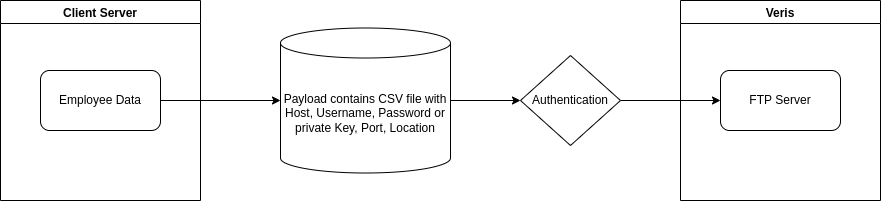
FTP push is a process where the client push files to Veris FTP server. Here Veris provide credentials containing HOST, USERNAME, PASSWORD , PORT, LOCATION, these creds are then configured with the client system to PUSH the file to our FTP server, using sftp protocol. To add and extralayer of security we whitelist the client server IP for the specific port, Further we provide Two ways of Authentication.
Password Based Authentication: This integration is based on Password based authentication. Veris provides HOST, USERNAME, PASSWORD, PORT, LOCATION which get simply integrated with the client system and they can start pushing the data to our FTP server.
Key Based Authentication: This integration is more secure but have development process on both side, Here client create a ssh key pair and provide us with the public key, we integrate that public key on Veris FTP server and client use the private key to authenticate instead of Password.
File Transfer Protocol (FTP) Based Pull.
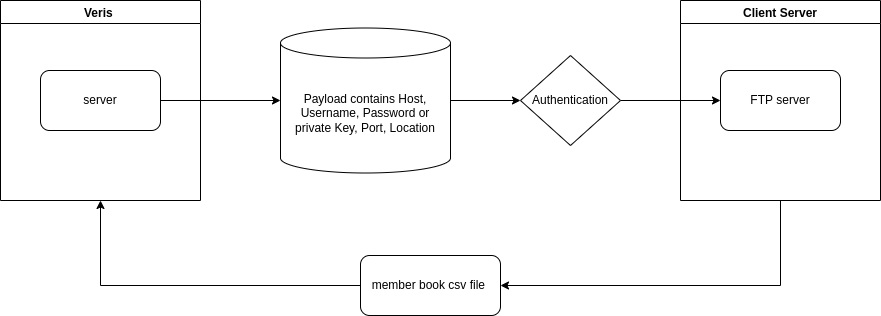
FTP pull is a process where the Veris Pull files from Client FTP server. Here client provide credentials containing HOST, USERNAME, PASSWORD, PORT, LOCATION, these creds are then configured with the Veris system to PULL the file from Client FTP server, using sftp protocol. Further we provide Two ways of Authentication.
Password Based Authentication: This integration is based on Password based authentication. Client provides HOST, USERNAME, PASSWORD, PORT, LOCATION which get simply integrated with the Veris system and we can start pulling the data from client FTP server.
Key Based Authentication: Here Veris create a ssh key pair and provide client with the public key, Client integrate that public key on thier FTP server and VERIS use the private key to authenticate instaed of Password. Once the system is complete Veris can start Pulling the files from client FTP server.